Saturday, October 02, 2010

MOSS 2007 – Configure Incoming email

Reading through these 2 technet articles, you get the main idea on how to set this up

Plan incoming e-mail (Windows SharePoint Services)

and in here

Configure incoming e-mail settings (Windows SharePoint Services)

In Windows Server 2008 R2,  there are some steps that are different from the technet articles.  My environment is as follow:

image

First is to add the SMTP server feature.  Open Server Manager, add features, and select the SMTP Server

image

once you click on this, it will bring another dialog box, prompting you to add more role services

image

It seems that it requires the SMTP Server Tools from the Remote Server Administration Role, and also the ODBC Logging.

click Add required button and continue. Now click on the Next button on the features wizard.

On the confirmation screen you can verify these 2 new roles

image

Click install.

After the installation, Open IIS 7, and under the Features View, double-click SMTP Email.

image

Click on Apply.

Now go back to MOSS Central Administration and click on the Incoming e-mail settings task for the Administrator

image

On the item,  task, select the Action: Configure Incoming E-Mail Settings.

image 

After you have configure the incoming email you can now receive emails on our SharePoint document libraries. Now you can follow the instructions on this article to get those emails inside your document library enable/configured email article.

Wednesday, September 22, 2010

How to Pre-Populate MySites with Pictures in SharePoint

Allowing MySites in a SharePoint environment is good.  But you have to put some governance into it.

Maybe one of the requirements from the HR department is to have only official taken pictures of all employees.  Make this easy to update, but do not allow the employee to change that information.

It's not me, nor you... ;)

Maybe, we need to avoid employees from uploading pictures on reflectives surfaces (bing keywords: ebay pictures kettle).

Anyways, the solution is to give control where control is needed.  In our case, we want the HR department to control what pictures are displayed and we want this process to be painless for them.

I have seen another solution in which they store the picture inside the AD.  But that solution is very cumbersome and not very user friendly.  Not to mention, that it will make the size of your AD database grow exponentially.

Here is an easier way.  Store the pictures in a picture library and then just store the url inside a custom field in your AD. There are 5 easy steps.

image

Step 1:  create a picture library to hold pictures (duh.)

Step 2: Modify your AD to put the url of the picture into the ExtensionAttribute1 field

image

Step 3: Map your AD field to the SharePoint field, and don't forget to set this field to Read-Only mode

image

mapped the field.

image

Step 4: import your user profiles from AD

Step 5: crawl through the user profiles to populate the information.

To test this, perform a search

image

there, Picture is display correctly.!

Wednesday, September 15, 2010

Doing the right thing

It’s been almost 2 months since I have left the independent life to become a full time employee.  I have found a small consulting company that shares most of the personal goals that I have in mind.  This company name is Halcyon. The main message is “to seek happiness for our customers and employees”.

Before entering into negotiations with them, I thought they were just another consulting company.  However, after meeting with the owner of the company and see his passion for charity work I’ve change my mind.

image It is very refreshing to find a company with such high ideals. While most companies I have come in contact with, have a few individuals that are very dedicated to help others, this company is different.  We are obligated encouraged to do community service.  As a good citizen, you are to do the right thing for others.  You know that, and I know that. But, when that command comes from the owner of the company, it trickles down to the all of the employees, and you can feel the effect.

Of course there are other perks like YOGA classes every other week. (which I have yet to attend one… ;)  So, in short, Halcyon is trying to bring a balance between your work and your personal life.  The fulfillment that comes from helping others is very different than the one you get when you get your paycheck.

Mohan latest project is to help integrate war veterans back into IT. Not just office work training, but actual programming training.!  I am just happy to be a part of this initiate of giving back to those that put their lives in danger for us. If all of us took the time to do a good deed every day, the world would be a different place…

Another aspect that I enjoy is the dogfood.  We are not only preaching SharePoint, but our CEO firmly believe in this technology.  We have BPOS as the technology for our intranet connecting both of our offices (US, India).  Also our website is built on SharePoint (soon to be SharePoint 2010).  Find out if your company uses SharePoint or just claiming to use SharePoint how to tell if a site is running SharePoint?

In all I am excited to start a new phase in my life and in my professional career.

Sunday, July 25, 2010

Using Excel as a Source for your Data Generation Plan in Visual Studio 2010

I like to use DataDude for almost anything related to SQL Server.  I use the data generation feature quite a lot.  Most of the times, I am happy with the string randomly(RegEx) created by it.  However, I encounter a situation in which I needed the random source to be in a group while still preserving the randomness of the wizard.

Of course, I could have created a SQL server temp table and use that as my sequential data bound field. However, I wanted to try to see if I could use a different source.

I’ve created a simple CSV with 3 columns, that I’ll use to populate my SQL server project.

image

Notice the name of the columns, and also the name of the worksheet.  You will need those for later.

Assuming your SQL Server Database has a table named CommtDefn.

image

Import the schema into a SQL server project in Visual Studio 2010. After you have imported your schema in your solution, you would be ready to populate this table with data. 

First step, is to add a new data generation plan, then select the table CommtDefn and, select the first column.

Your Data Generation plan would initially look like this

image

Select the first column and choose the Sequential data bound generator option.

image

Under the properties window, select <Add new connection..>

image

then on the Data source screen, select <other>.  For the data provider, use the ODBC provider, and not the OLE DB Provider as instructed in MSDN.  Now click Continue

image

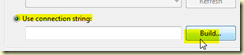
On the connection properties, select the Use Connection string. NOTE: the trick in here is to specify the type of connection we are going to use
image

So in this box type the following:

Dsn=Excel Files

Now, click the build button. A dialog box will pop up asking you to select the Data Source, click OK to dismiss this dialog box. This action will bring another dialog box where you can specify the actual excel file you want to use.!!

image

Select your Excel worksheet, and then click OK.  The Use Connection string field is populate with the proper connection string:

Dsn=Excel Files;dbq=C:\vsProjects\2010\PowerShell.SQL\PowerShell.SQL\Excel CSV\Committees.xlsx;defaultdir=C:\vsProjects\2010\PowerShell.SQL\PowerShell.SQL\Excel CSV;driverid=1046;maxbuffersize=2048;pagetimeout=5

Click on the Test Connection button, make sure it is successful. Click OK twice to close all dialog boxes.

Go back to your Properties window and write the following query

SELECT * FROM [CommitteesDefinitions$]

In here, don’t forget to enclose the name of the worksheet in parenthesis and also you need to add the “$” at the end of it.

Your screen should now look like this

image

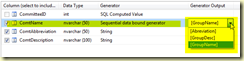
Now if you go back to the data generation screen, you will see that the Generator Output column has been populated with the columns extracted from the Excel worksheet.!!
image

* BTW, there is a MSDN article on how to generate data from an excel spreadsheet, but after following those instructions I could not get that to work with VS2010 data generated plans.

Tuesday, June 29, 2010

How to remove SQL Mirroring from MOSS 2007

So mirroring technology with SharePoint 2007 does not seem to be working as expected. As a consequence, the decision to remove it from our production servers was made.

I have been trying to remove the mirroring from the SQL Serve 2008 R2, and it still shows the Mirror Databases on the secondary server.  Worse, the status does not change, it is still showing as (Restoring).

image

from the MSDN, this is supposed to be an easy step: ms189112 but it is not.!

As you can see, my SQL1 server has the actual databases, while SQL2 is supposed to have the mirrors of SQL1.

A quick search on the internet turned nothing to the (Restoring…) status message.  Connecting to the second SQL Server and trying to delete the database were encountered with failure.

TITLE: Microsoft SQL Server Management Studio
------------------------------

Alter failed for Database 'SPSProd_Main_Search'.  (Microsoft.SqlServer.Smo)

For help, click: Some useless article on MSDN

------------------------------
ADDITIONAL INFORMATION:

An exception occurred while executing a Transact-SQL statement or batch. (Microsoft.SqlServer.ConnectionInfo)

------------------------------

ALTER DATABASE is not permitted while a database is in the Restoring state.
ALTER DATABASE statement failed. (Microsoft SQL Server, Error: 5052)

  Then I went into the query editor and ran the

DROP DATABASE <databasename> from the master databases. It worked.!

image 


Command(s) completed successfully.!  :)

Monday, April 26, 2010

How to Synchronize LiveWriter’s blog drafts using LiveMesh

Technorati Tags: ,,

I have a myriad of environments that I am working with.

image

Windows XP Pro, Vista x64, Win 7 Ultimate x64, Win 7 Home Premium x86, Win Server 2008 R2.

Throughout the day I am in any one of these environments. I would get an idea for a blog post, then I start to write a draft.  Next thing you know, I am out to do something else so I save the blog post as a draft and exit live writer.  However, there are times when I could dedicate a couple of minutes to continue that draft (Dr's appt which are the norm and not the exception lately.. :(.   Come to find out that I've written the latest updates on a different computer.  I began to research on the practicality of using an online storage. 

Experimented with Dropbox for a little bit. It works ok for single files, but it is not very flexible for blogging.

So, I have started to use Live Mesh to keep all of my drafts, that under different locations, into a single repository. The only problem with Live Writer is that it does not allow you to specify the location in which to save the drafts/posts (Build 14.0.8089.726)

The trick to get Live Mesh to synch all of the content,  is to find the path where the drafts are stored.  I have compiled a handy table of paths for the OS'es I've used:

Environment Path
XP Pro C:\Documents and Settings\arnulfo\My Documents\My Weblog Posts
   
Vista C:\Users\Arnulfo\Documents\My Weblog Posts
   
Win 7 C:\Users\arnulfo\Documents\My Weblog Posts


Then all you have to do is setup your Live Mesh folder to point to these locations.

Go to your Mesh folders, Manage Folders

image

Then when you set the folder in Live Mesh, specify the correct path location depending on the OS you are running.  For i.e. this the default location for Win 7

image

I change it to

image

That’s it.!  Now if you go to the Live Mesh Folders and check the synch settings

image

you will see all of the devices where my blog draft/post will be synchronized.

image

happy blogging… :)

Thursday, September 10, 2009

Installing SQL Server 2008 x64

If you want to have the DAT and LOG files on a separate drive, perform the standard setup and choose the default values.

On the feature selection window, make your selection and DO NOT CHANGE the location where your shared features will be.

image

If you do so, you will get this error message, and WILL have to restart the installation all over.

The INSTANCESHAREDWOWDIR command line value was not specified. This value must be specified when the INSTANCESHAREDDIR value is specified.

image

Read about it from the msdn knowledge base 955458.

Funny, it complaints about INSTANCESHAREDDIR when it is really looking for the WOW64 shared components directory INSTALLSHAREDWOWDIR.

Check the Configuration file path at the Ready To Install screen:

image

If you open this ConfigurationFile.ini you will see the entries what the boot strapper is looking for.

Continuing with the default installation, you will get to the Database Engine Configuration screen, that’s is where you can specify the location for the DAT and LOG files.

image

Non-intuitive, IMHO.

Wednesday, May 27, 2009

My Developer Environment

I’ve read Steve Smith post regarding Developer’s Machine.  Great post.  Got me thinking about my development environment…

Background: to fully understand the whole lifecycle of a solution, you need to know not just Unit test or integration tests. But also about  the backend/infrastructure where this application would eventually live. 

For instance, I have been involved in several integration projects at different clients. The solution calls for situations that involved multiple users, multiple roles, multiple permission profiles.  Yet, they only provided me with a SINGLE account to their environment to fully test my application.!

Being an integration geek, you need to have a bigger bag of utilities to help you being certain that your app works as intended.  IMHO, you not only need to know about IIS settings/security, but also about AD, Clustering, SQL roles, etc.  And it is not enough to just READ it from a blog.  You need to experienced it and work with it.  You need to be a JOAT.

Ideally, like Steve’s view, the Developer workstation will be both mobile and desktop.  It is nice to be able to take that mobile environment with you.  However, most of the times while working at home, I would trade my portability for some speed and flexibility. I like desktops with Dual screens (wish I had more than 2 monitors… :) and full size keyboards. I like to feel a mouse and not those annoying keypads/touchpads. Yes, I do HATE touchpads…!

I had built my own controlled environment (SandBox).  This is so that I can experience what the network operator/admin that is going to inherit my application would experience. Under this controlled environment, I can test the full cycle of my software (deployment, running, integration) . Nothing worse that going into a client’s environment and say: “… but, it works on my machine…”

I know that now a days, with VM’s (VPC/VMWare), building a Sandbox environment is easier and cheaper.  However, there are pros/cons for virtualization vs real machines. I feel that my investment was well spent.  My future upgrade will be to beef up my SQL server (still keeping it as a real machine).  Then put a couple of VM’s on the app and the web servers to test NLB and some Farm features of BizTalk and SharePoint.

CIMG6596 old CRT 14" monitor. No LCD here… :(
CIMG6592 I selected 4u cases for my servers, since they can fit  standard hardware (MB, Power Supl., video, nic’s) = cheaper…

4U – App Server
4U – SQL Server
2U – Web server
Guess which case I bought first…. ;)
CIMG6580 16-Ports Switch used to be plenty of ports over 5 years ago… :(
 CIMG6581 LAN lines.  Rest of my hardware ( 3 laptops, NetBook, Wii, NDS’s) are all on the Wi-Fi.
CIMG6573 Power master switch for all servers.
CIMG6587 KVM switch.
CIMG6595 My mini-keyboard. Love it…


BTW, I think building your own computer is still the way to go.

Friday, May 01, 2009

PANAMA 2009 Elections: RERE, TE, PLAGEL, CPP

Having dual citizenship give me the opportunity to choose and to compare 2 different ways of voting. I casted my vote for the most powerful man of the free world back on Nov. 2008, and now I have the privilege to influence who will lead my Querida Panama for the next government.

Since most people I know in the US have no idea about presidential elections outside of the US, I want to share a little bit of knowledge.

There are 8 political parties (as of today ;)  in Panama.  The main one is the PRD (Partido Revolucionario Democratico). It stands for Revolution and Democracy.  BTW, it is the same government that we had with Noriega. All of the other parties are opposition to this one.  Each of them claims to be different because of  X-Some facts/view. 

People line up with the political party that they feel, closely matches their views, concerns.  However, if you work for any government institution it is expected that you lined up with the PRD, if you don’t your job might/will be at risk.  All of the parties put their candidates up and start the political satire that occurs everywhere, in which they try to convince the audience that they party is better than the other ones.

This all seems very similar to the US elections.  Start with the flow of information on the Radio, TV, Newspapers (negativity and lies).  However, in Panama, they also do Posters, Billboards, Musical Tours. There are about 3.5 million people in Panama according to the CIA world factbook. Since the population is so disperse, one of the ways to get your message across is to *tour* the small towns.  What is different about this, is that they bring what is called MURGAS to each city.  It is basically a band playing folklore music. There is plenty of free drinks and dancing. Most of the times they close the roads and make the whole road a big staging area.

DSC_1105 Another of the ways they publicize their slogans.

People rent their cars/time to drive around small towns and playing loud messages over their megaphones. ANY time of the day.!!


One thing you need to know about the Panamanian culture, and all Latin cultures for that matter.  We are very centric on socializing and having a good time. So the Murgas, attract the majority of the local audience, and if you have a good time with this candidate’s murgas, then voting for this candidate will bring more of the good time, right?… ;)

This is what an official ballot looks like. You need to select ONE entry only.  As you notice there are only 3 candidates to president.  Just like in the US (Rep., Dem., Waste-your-vote).  Now, we started with 8 political parties, and as the election date gets near, each party aligned with the candidate that they think will win. 

CIMG6555

In Panama, there is still a lot of bribery. (just like in the US, but not as organized ;).  So if you are in one of the political parties that have won, you can expect to have favoritism over jobs and influences once the new party takes over.  One step further, you can even put your own people on jobs that are already filled by people from the losing party..!  And this is regardless of qualifications/tenure.  It is all about who you know.

image
Molirena
image
Union Patriotica
image
Vanguardia Moral de la Patria
image Partido Popular
image
PRD
image
Partido

Panameñista

image
Cambio Democratico
image
Partido Liberal

So you see, there is LOTS of thing riding on your vote. Not just the future of your country, but also your vote affects DIRECTLY your future.  The percentage of people willing to vote in Panama is a LOT higher than in the US for that matter.  In the US, we get to elect the most powerful man in the world, and yet I see many people that are not even excited about having this privilege.!

Hope this little bit of info have brought you a new insight into exercising your right to vote.

BTW, there are LOTS of acronyms used in Panama.  TE: Tribunal Electoral.  CPP: Centro de Procesamiento Postal.  PLAGEL: Plan General de Elecciones. RERE: Registro de Electores Residentes en el Extranjero.

Thursday, March 19, 2009

Exam 70-541 – Developing for WSS 3.0 Study Guide

One of my goals for 2009 is to get certified in SharePoint development. I have found that you can get some good/cheap/professional online training from Microsoft Learning.  If you go to this link Microsoft eLearning Collection and follow the instructions, you can obtain the e-learning promotion code.  Then you get to use this code to choose ANY training material for only $35.00.  I have chosen the Collection 5385, which coverts all of the topics needed for the 70-541 test.

  • Course 5386: Working with Server and Site Objects WSS 3.0
  • Course 5387: Programmatically Securing WSS 3.0 Sites
  • Course 5388: Programming Lists and List Events in WSS  3.0
  • Course 5389: Managing Documents and Libraries in WSS 3.0
  • Course 5390: Working with List Metadata and Content Types in WSS 3.0
  • Course 5391: Customizing Navigation and Layout in WSS 3.0

Their course is very interactive. It contains videos, labs, code snippets, games, etc

image

Once you finish with the course, then you can start doing the interactive labs. Microsoft gives you one full hour to use on the virtual labs.  I’ve found that this is plenty of time to complete the labs, if you don’t do the extra assignments.

image

The only issue I have with the labs, is that I wish I could get a hold of the solution code that is being used in those labs.

Overall, I did like the simplicity of these labs.  I would highly recommend them for anyone looking to pass the exam 70-541.

I took the 70-541 test today.  It is a 3:00 hour test.  According to my calculations, I needed to get 41/59 correctly answered questions in order to pass. I did get more than 41 questions correctly answered. ;)    At the end of the test, I have but 22 minutes left, time flies when you are having fun.!

Hints for the test?  Setup your own VPC and a Domain Controller, so that you can go explore web parts and Document Workflows a little deeper than what they offer on the eCourse.  It certainly helped me a lot… ;)