Sunday, April 29, 2007

Repair.aspx can't get to the message

In the current project I am working on, there is a need to move some InfoPath forms from one Sharepoint library to another while preserving the information contained in them. The one caveat to this, is that one of the requirement is that we need to modify a couple of fields inside the infopath forms.

In summary these are the tasks that I need to accomplish:
  • Modify the PI (Processing Instructions) for each form in Sharepoint so that they point to the correct template library.
  • Modify some of the data inside of the Infopath forms (since the data is contained inside the Infopath). This includes updating and adding a couple of nodes.
These fields are then used by Biztalk when routing the document to another Sharepoint library. I have tried several approaches.

A. Repair.aspx. This form is found inside the FORMS folder on your Sharepoint library. It does fix the hardcoding href command found on the PI (Processing Instruction) for the InfoPath forms. It will accomplish one of my goals, however the user interface is not the most friendly. For instance, one of the source library location, have over 1500 forms. If you decide to use the Repair.aspx, that's a lot of clicking you got to do..!!

B. Microsoft repair download tool for infopath 2007. This tool can be download here. This is pretty much the EXE version of the repair.aspx. It is called: IPWssUpg.exe. It goes s and change the hard coded values of the InfoPath forms to the current location. This is mainly used when you are moving to a new server, or copying forms to a new library, etc. This tool can accomplish Task 1, but it wont be able to modify the actual content which is what I am after in Task2.

C. Write a .NET component to parse the Sharepoint lists and then load the whole Infopath as an XML file and apply regular expressions to accomplish Task 1 and 2. Lazy.

D. Use Biztalk to do it. Since we already have Biztalk 2006 deployed on the environment, it can be put to good use. ;)

E. Powershell?. maybe, but I don't have the time to learn it right now.

Enter Biztalk 2006. In just 7 lines of code I can accomplish both Task 1 and Task 2. By using the Windows Sharepoint Service Adapter (WSS).

First, setup a basic orchestration:


then on the Message Constructor, add the following lines:

Add Updated PI

1 //Messages are immutable.

2 outMsg = inMsg;

3

4 //populate the new infopath PI

5 sInfopathPI = @"< ?mso-infoPathSolution PIVersion='0.9.0.0' href='some_XSN_Path'? > ....";

6

7 //issue the command

8 outMsg(XMLNORM.ProcessingInstructionOption) = 1;

9 outMsg(XMLNORM.ProcessingInstruction) = sInfopathPI;


WSS Instructions

1 //set the filename for target location

2 outMsg(WSS.Filename) = strFilename + ".xml";


BTS Instructions

1 //if a form document is found on the library, overwrite it.

2 outMsg(WSS.ConfigOverwrite) = "yes";

3 outMsg(WSS.ConfigOfficeIntegration) = "no";


Make sure that both the receiving and sending logical ports are setup to Specify Bindings Later.
Then using the Biztalk Administrator console, configure a Receive Location and a Send Port to use the WSS adapter, put the values for the Sharepoint Library (both source and target locations)

Bind the physical ports to the logical ports, and the ODX will pick the forms from the source library and move them to the target location.

7 lines of code!!! Can't get any lazier than that.. ;)

Friday, April 27, 2007

Biztalk Services

Internet Service Bus? yikes, I am still waiting at the bus stop for the ESB one so that I can do a transfer. :(

Brian wrote a very informative post on the internet service bus concept. Check it out here.

The demo they have at the biztalk labs is ok. I was able to create a personal identity card in less than 5 minutes. Useless, but fun. Then I try to use the Relay Service, and it tells me that I need a Managed Card. WTF? Once again, I think the technology is in its infancy right now, so I am not risking anything by waiting for a few more months for it to mature.

Also the recommended OS to do any development with it is windows 2003. Oh com'on, I am in cloud nine running Vista 64bits, I am not going back...;)

I guess that there are always those VPC's to take you back to nostalgia lane.

Friday, April 20, 2007

Changing PI on an Infopath Form using repair.aspx

So there is this utility inside Sharepoint 2003. If you ever copy your forms from one library location to another library location, they will copy, but the PI (Processing Instructions) inside the Infopath forms will still be pointing to the original location where the template.xsn was located.

So all of your newly copy Infopath forms when opened they will go to the original location for the template. For instance if your original location is:
http://yourSTS_site/Books_2005

and you copy this to a new location, say:
http://yourSTS_site/Books_2006

the Infopath forms in the 2006 library will contain the PI
   15 <?mso-infoPathSolution  PIVersion='0.9.0.0' href='http://yourSTS_site/Books_2005/Forms/template.xsn'?>
   16 <?mso-application  progid='InfoPath.Document'?>
   17 <?mso-infoPath-file-attachment-present?>

and what you really want is the PI to say something like this:

   15 <?mso-infoPathSolution  PIVersion='0.9.0.0' href='http://yourSTS_site/Books_2006/Forms/template.xsn'?>
   16 <?mso-application  progid='InfoPath.Document'?>
   17 <?mso-infoPath-file-attachment-present?>

Enter the repair.aspx utility.! If you type the following:
http://yourSTS_site/Books_2006/Forms/repair.aspx

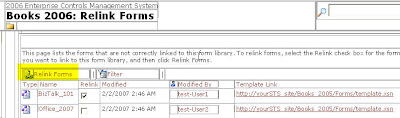
then you will get a page that will display all of your forms that have the wrong PI embedded into them and then you can select which ones to update.


Click on the Relink Forms command and they will be automatically updated to use the current form library template.

Neat-o.

Wednesday, April 18, 2007

Biztalk Web Service Publishing Wizard not found...!

I have run into this situation a couple of times. It is one of those RTFM, I am blogging it here so that it gets indexed and someone will find it useful.

On a windows server 2003 with multiple server installation. There are times that the Web Service Publishing Wizard option is not available on the Biztalk group.


This is because somewhere along the installation instructions, someone skip the step that instruct you to install Visual Studio 2005. Perhaps this is a mis-conception, that you dont need Visual Studio if you are setting up a QA environment, or even a production environment. This might be true, but if you need to use the Web Service Publishing Wizard, you will need to install the Visual Studio runtime and the SDK for .NET 2.0

Run the Visual Studio Setup. Select custom, then select C# and select the SDK option.


After this is installed you will need to re-run the installation setup for Biztalk. Select Modify and then select the Developers Tools and SDK checkbox. Click OK to continue.


now if you pay attention to the status screen, you will see this message being display


after the installation is done, open the program selection and you will see that now we have the Biztalk Web Services Publishing Wizard available to choose.

Monday, April 16, 2007

Biztalk Only eMagazine

Cool initiative. Todd VanNurden and Sal Cincotta are getting back to the basics and created a magazine dedicated to Biztalk. From his initial email:

"...The goal of BizTalk Hotrod is to provide information beyond what you'd normally find on Microsoft sites and its written by people with the real experience..."

This is going to be awesome!. Go and download the first copy at http://biztalkhotrod.com/default.aspx.

Wednesday, April 11, 2007

Microsoft free developer e-training

Found this link to Dave Bost blog. He has instructions and the voucher number to use in order to access the free e-Learning courses from Microsoft Training. The courses available seems to cover a wide range: Data and XML, Web, .NET 2.0, Windows, ASP.NET, etc.

Check it out here.

Friday, April 06, 2007

Biztalk 2006 Installation on Multiple Servers

So this is the 3rd time I have encountered this error, so I am blogging about it... Hoping, that by blogging it, it will re-inforce this in my brain and next time I encounter this error, it wont take me that long to figure it out.

Installing Biztalk 2006 on an environment that was previously setup by an IT department with a zealous security guy making the decisions on naming conventions and user accounts is a NIGHTMARE. You can have firewall, ports, security policies, insufficient rights to SQL Server, application pools not setup correctly, etc...

This one environment I have had to work with was just like my IM name ;). Anyways, after about an hour or so trying to find out why the configuration of Biztalk 2006 will just suddenly die after creating 3 databases. I keep getting this one error:

BizTalk Server cannot access SQL server. This could be due to one of the following reasons:

  1. Access permissions have been denied to the current user. Either log on as a user that has been granted permissions to SQL and try again, or grant the current user permission to access SQL Server.
  2. The SQL Server does not exist or an invalid database name has been specified. Check the name entered for the SQL Server and database to make sure they are correct as provided during SQL Server installation.
  3. The SQL Server exists, but is not currently running. Use the Windows Service Control Manager or SQL Enterprise Manager to start SQL Server, and try again.
  4. A SQL database file with the same name as the specified database already exists in the Microsoft SQL Server data folder.

Internal error from OLEDB provider: "Cannot open database "BizTalkRuleEngineDb" requested by the login. The login failed."

And btw, I only had access to 2 domain accounts, instead of the 10+ accounts recommended to run Biztalk with. So finally my friend Monish mentioned about installing the SQL client connectivity tools on the Application server where Biztalk was being installed. duh. Just another case of RTFM. Here is the Biztalk Installation Guide. Cleaned up the old DB's and re-started the configuration, and this time it created all databases.

Makes me wonder, why is the configuration tool of Biztalk running and creating half way installation scripts, but yet it can't finish creating the rest of the databases. I guess I need to dig more information into this.

Thursday, April 05, 2007

Search Macros vs Swickis

There is are so many customized search engines out there. We had the original Swickis, and now the Window Live team has come out with the Search Macros.

My only gripe about these macros is that it is very hard to discover what other search macros are available.

I have found this one that was created by the SQL Server 2005 BOL (Books Online Library) team.
http://search.live.com/macros/sql_server_user_education/booksonline

One click and you get access to the latest version of the books online. Versus:
  1. downloading a 130+ MB msi file
  2. installing it
  3. opening CHM file to get to search prompt
If you are at a client site and need to research some sql info on the fly. I believe the Search Macros would be the winner.

Tuesday, April 03, 2007

Biztalk Server 2006 R2 - Beta2 available

Biztalk 2006 R2 was supposed to be out yesterday. However, the official site

http://www.microsoft.com/technet/prodtechnol/biztalk/2006/default.mspx

did not have a link to it. I have found the R2 at this other url:

http://connect.microsoft.com/site/sitehome.aspx?SiteID=65,

you will find the url for the R2 on the right hand side. Click on it and that will take you to the connect home page. You will need to log in with your Microsoft Passport to be able to see your connections.

If you have not applied for the R2 program, scroll to the bottom and apply. After you apply you will be able to see the download screen (see below).

Will post more after I *play* with it… ;)


Monday, April 02, 2007

Welcome, Frazzled Dad...!

Yeah, it is official. Jim Holmes will be joining Quick Solutions.!!! It is exciting to be able to say that we work with 2 of the most influential people in the .NET community in Ohio.

Brian and Jim will take the Solutions Team to a level never before seen...!!!

Welcome to the team, Jim.

Thursday, March 29, 2007

SQL Server 2005 – SP2 available

We can *officially* run SQL Server 2005 on Vista... ;) All of those days of reading messages about SQL not being supported in Vista are finally over.!

Here is the query to determine your version of sql:

SELECT SERVERPROPERTY('ProductVersion')

9.00.1399

SQL Server 2005

9.00.2047

SQL 2005 with SP1

9.00.3042

SQL 2005 with SP2


You can download the SP2 at the SQL Server 2005 SP2 Download Page.

Wednesday, March 28, 2007

Free book on Building Composite Applications - OBA

With the release of Office 2007 and the whole enterprise suite, there seems to be a lot more buzz on the net about creating Office Business Applications (OBAs) to integrate enterprise business. This integration revolves around the idea of the ESB, which of course Biztalk seems to be the best implementation of it. IMHO. ;)

Developing in Sharepoint 2007, Infopath 2007 and Biztalk 2006 seems to fall into this category. There is a book written that Microsoft has made available for free download. Here is the link to Mike Walker's blog. He is one of the authors of the book. You can download the book here.

According to his blog, the LOB (Line Of Business) for loan originations will be out pretty soon. And this LOB will contain all of the files needed to implement the Loan Origination Solution. Including guidance package, enterprise blocks, etc. Nice. I can't hardly wait to start playing with this.

I like how Microsoft is leading the way by providing Best Practices (Enterprise Library) and Guidance Packages(GAX) that developers can follow when implementing enterprise solutions that have reusability and extensibility.

cool.

Sunday, March 25, 2007

Cincinnati Code Camp 2007

Original Plan:
  1. Get Up at 4:00am
  2. Meet James and Monish at 4:30am at the office
  3. Pick up Alexi at 5:00am at the Stringtown exit
  4. Arrive at Cincinnati at about 6:30am
  5. Go to IHOP for breakfast.
  6. Arrive at Code Camp before 7:30am to help out on the registration
Actual Plan:
  1. Phone call at 4:45am from Monish.
  2. [2-5] same workflow
  3. Arrive at Code Camp at 7:45am.
Mental Note: when you are setting your alarm you should make sure it is setup for the correct day. I set my alarm for 4am on FRIDAY... :(

To make up for the lost 30 minutes, I was doing about 74.6 miles/hr down on I-71 South. We make it to Cinci at about 6:50am. However, finding the IHOP was a little bit more complicated than we expected. Google sent us driving through neighborhoods and dead end streets for a while. Finally we made it to the IHOP and the Code Camp.

1st Session: Missed it [front registration duty]

2nd Session: Getting to know Generics by Dustin Campbell
Dustin was showing some of the gotchas using generics. One of the main point he was try to make was that sometimes developers do not know what else is out there and use Generics for all return values. He explained about a couple of namespaces which will return Read-Only generic types, which are safer for public interfaces.

3rd Session: Real World Sharepoint by Jim Holmes
What can I say? He is good.! Jim was doing the Sharepoint 2007 presentation yesterday at DevCares, and today's presentation was not a repeat.! One thing that I learn, is that the BSOD is still available in Windows Vista.! Jim got a BSOD right at the beginning of the session.! :)

4th Session: Intro to XNA by William Steele
Bill's presentations are always amazing. I have a bigger interest in the XNA Development Toolkit, since I am volunteering some of my time to teach kids about programming. So this knowledge will compliment my presentations. I am using Kids Programming Language, and the way XNA works, it seems that this will be an awesome transitions for kids that are captivated by game development and want to move on to more advanced topics.

5th Session: Intro to Robotics by William Steele.
This was by far the most fun presentation I have attended in a long time. The concept with the Microsoft Robotic Studio is almost the same: Microsoft is providing most of the skeleton/framework code for you, so that you can concentrate on the actual code for your robot and not how the robot works.

6th Session: Real World Agile by James Avery
His session was in the same format as the Open Spaces at CodeMash. The only difference was that the topic was defined by James and not the audience. But the 2-way interaction was there and it was good. Good questions and good suggestions from the audience, kept the presentation going past the time. To the point that they were tearing down the wall for the closing session while James was still talking.! funny.

Overall, I think that the Code Camp was a very nice local event. There were plenty of drinks till the end of the day. Food as expected in a conference. It was nice being part of the developer community. I will definitely come back next year. Kudos to Mike Wood and all of the volunteers there, they did an awesome job.

Wednesday, March 21, 2007

Cool Vista Secrets

I have found the site of Tim Sneath (Vista Technical Evangelist). He has posted a couple of hidden treasures that you can find on Vista. It is just AWESOME.

Here is the link:

http://blogs.msdn.com/tims/archive/tags/secret/default.aspx

My favorite secrets:
#4: Disabling UAC

#1: Open comand prompt

#2: Copy as path

#8: Zoom in Explorer.

#11: Deleting the Undeletable
nice, very nice... :)

Tuesday, March 20, 2007

Guidance Automation Toolkit Installation Failure on Vista

When trying to install the Guidance Automation Toolkit under Vista, you might encounter this error:
The installer has encounter an unexpected error installing this package. This may indicate a problem with this package. The error code is 2869.
This is an RTFM issue. ;) According to the documentation of December 2006, it mentions that this error is because of the UAC (User Account Control) of Vista. They also provide the work around: Run the MSI installer from a VStudio Command prompt that has elevated privileges (Run as Admin).

To install the Service Factory on Windows Vista

1. On the taskbar, click Start, point to All Programs, point to Microsoft Visual Studio 2005, and then click Visual Studio Tools.

2. Right-click Visual Studio 2005 Command Prompt, and then click Run as administrator.

3. Using the Change Directory (cd) command, navigate to the folder where the .msi file is located. For example: C:>cd users\me\downloads.

4. Run msiexec.exe using the following syntax.

msiexec /I "GuidanceAutomationToolkit.msi"

5. Complete the remainder of the installation as described in Installing the Service Factory.


the path to these set of instructions can be found on the CHM file:
Web Services Software Factory - December 2006
----Installing the Service Factory

--------How to: Install the Service Factory on Windows Vista

Thursday, March 15, 2007

GUID should contain 32 digits

If you are calling a Store procedure that accepts GUID's as parameters, you will need to initialize those parameters to a valid GUID, before executing the ADO command.

This is the error you will find on the event log:

Guid should contain 32 digits with 4 dashes (xxxxxxxx-xxxx-xxxx-xxxx-xxxxxxxxxxxx).

to solve this, you can either initialize the GUID to Empty:
GUID paramGUID = new GUID.Empty();
or set the parameter to the string:
GUID paramGUID = new GUID("00000000-0000-0000-0000-000000000000");

Wednesday, March 14, 2007

Required Permissions on Web Service Factory

If you get this error, when trying to deploy your ASMX web service factory, it could be because of the trust permission. To fix this problem, open your web.config and anywhere inside the <>,
add the following:
< level ="Full" originurl="">
and it should work.

Server Error in '/XYZServices.Host' Application.
-------------------------------------------------------------------------

Required permissions cannot be acquired.
Description: An unhandled exception occurred during the execution of the current web request. Please review the stack trace for more information about the error and where it originated in the code.

Exception Details: System.Security.Policy.PolicyException: Required permissions cannot be acquired.

Source Error:
An unhandled exception was generated during the execution of the current web request. Information regarding the origin and location of the exception can be identified using the exception stack trace below.

Stack Trace:
[PolicyException: Required permissions cannot be acquired.]
System.Security.SecurityManager.ResolvePolicy(Evidence evidence, PermissionSet reqdPset, PermissionSet optPset, PermissionSet denyPset, PermissionSet& denied, Boolean checkExecutionPermission) +2738437
System.Security.SecurityManager.ResolvePolicy(Evidence evidence, PermissionSet reqdPset, PermissionSet optPset, PermissionSet denyPset, PermissionSet& denied, Int32& securitySpecialFlags, Boolean checkExecutionPermission) +57

[FileLoadException: Could not load file or assembly 'Microsoft.Practices.ObjectBuilder, Version=1.0.51205.0, Culture=neutral, PublicKeyToken=null' or one of its dependencies. Failed to grant minimum permission requests. (Exception from HRESULT: 0x80131417)]
System.Reflection.Assembly.nLoad(AssemblyName fileName, String codeBase, Evidence assemblySecurity, Assembly locationHint, StackCrawlMark& stackMark, Boolean throwOnFileNotFound, Boolean forIntrospection) +0
System.Reflection.Assembly.InternalLoad(AssemblyName assemblyRef, Evidence assemblySecurity, StackCrawlMark& stackMark, Boolean forIntrospection) +211
System.Reflection.Assembly.InternalLoad(String assemblyString, Evidence assemblySecurity, StackCrawlMark& stackMark, Boolean forIntrospection) +141
System.Reflection.Assembly.Load(String assemblyString) +25
System.Web.Configuration.CompilationSection.LoadAssemblyHelper(String assemblyName, Boolean starDirective) +32

[ConfigurationErrorsException: Could not load file or assembly 'Microsoft.Practices.ObjectBuilder, Version=1.0.51205.0, Culture=neutral, PublicKeyToken=null' or one of its dependencies. Failed to grant minimum permission requests. (Exception from HRESULT: 0x80131417)]
System.Web.Configuration.CompilationSection.LoadAssemblyHelper(String assemblyName, Boolean starDirective) +580
System.Web.Configuration.CompilationSection.LoadAllAssembliesFromAppDomainBinDirectory() +203
System.Web.Configuration.CompilationSection.LoadAssembly(AssemblyInfo ai) +45
System.Web.Compilation.BuildManager.GetReferencedAssemblies(CompilationSection compConfig) +178
System.Web.Compilation.WebDirectoryBatchCompiler..ctor(VirtualDirectory vdir) +199
System.Web.Compilation.BuildManager.BatchCompileWebDirectoryInternal(VirtualDirectory vdir, Boolean ignoreErrors) +37
System.Web.Compilation.BuildManager.BatchCompileWebDirectory(VirtualDirectory vdir, VirtualPath virtualDir, Boolean ignoreErrors) +445
System.Web.Compilation.BuildManager.CompileWebFile(VirtualPath virtualPath) +77
System.Web.Compilation.BuildManager.GetVPathBuildResultInternal(VirtualPath virtualPath, Boolean noBuild, Boolean allowCrossApp, Boolean allowBuildInPrecompile) +596
System.Web.Compilation.BuildManager.GetVPathBuildResultWithNoAssert(HttpContext context, VirtualPath virtualPath, Boolean noBuild, Boolean allowCrossApp, Boolean allowBuildInPrecompile) +76
System.Web.Compilation.BuildManager.GetVPathBuildResultWithAssert(HttpContext context, VirtualPath virtualPath, Boolean noBuild, Boolean allowCrossApp, Boolean allowBuildInPrecompile) +52
System.Web.Compilation.BuildManager.GetVPathBuildResult(HttpContext context, VirtualPath virtualPath) +36
System.Web.UI.WebServiceParser.GetCompiledType(String inputFile, HttpContext context) +44
System.Web.Services.Protocols.WebServiceHandlerFactory.GetHandler(HttpContext context, String verb, String url, String filePath) +71
System.Web.HttpApplication.MapHttpHandler(HttpContext context, String requestType, VirtualPath path, String pathTranslated, Boolean useAppConfig) +328
System.Web.MapHandlerExecutionStep.System.Web.HttpApplication.IExecutionStep.Execute() +139
System.Web.HttpApplication.ExecuteStep(IExecutionStep step, Boolean& completedSynchronously) +146

--------------------------------------------------------------------------------
Version Information: Microsoft .NET Framework Version:2.0.50727.42; ASP.NET Version:2.0.50727.210


Monday, March 12, 2007

Intellisense on Infopath 2007

This is a very useful post from the Infopath team blog about enabling IntelliSense on your Visual Studio IDE.

Enabling InfoPath InteliSense Documentation in VSTA and Visual Studio.

Sunday, March 11, 2007

How to pre-compile an ASMX web service

Usage:

aspnet_compiler -? to view options. The ones I used are:

-v

Virtual path of app (i.e. “/MyApp”)

-p

Physical directory of the app

-keyfile

Location of strong name key file (snk)

-f

Overwrite previous content

So for example, we have a web service named SoxAuditWss, if we need to move this web service to the QA machine, we could pre-compile it by using the following command:

aspnet_compiler
-v /SoxAuditWss
-p "C:\vsprojects\Services\SOXAuditWSS"
-f "C:\vsprojects\Services\bin"
-keyfile "C:\vsProjects\Services\BTS\yourkeyhere.snk"

Dont forget to add the Key to the compilation step. This is necessary if you are moving this web service to a different machine.